Trying to make a business card worth keeping
I need some new business cards for the first time in over 20 years. Most of my work has come from regular clients, but now I’m meeting prospective clients in person again.
I want the card to keep working for me after I’ve handed it over. Ideally, it would stay on someone’s desk rather than disappear in the next tidy-up.
I’ve been thinking about this for ten or fifteen years. I’ve seen plenty of interesting business cards in that time, but I’ve never settled on one that would work for me.
A functional card
Some of the best examples are tied to the craft of the person handing them out. An architect might have a stainless steel card etched with a ruler; a woodworker, one made from different wood grains.
I’ve heard of software developers putting a Linux web server on a business card. I like the idea, but it’s too technical for my audience.
I don’t want to talk someone through debugging a web server when I’m trying to sell ease of use and automation.
A USB drive in the shape of a business card seems more useful. People can use it without much explanation, and there’s a reason to keep it. You can even buy them off the shelf.
Getting carried away
I searched for a card with USB-A and NFC (so people can tap their phone on the card to get my contact details), then realised it needed to work on a MacBook with only USB-C ports. But I couldn’t find a supplier offering all three.
After staring at a circuit design in KiCad, I realised I was getting carried away. A card with both USB-A and USB-C will work. I can add NFC later if needed.
I’ll use the website’s colours and branding on the card.
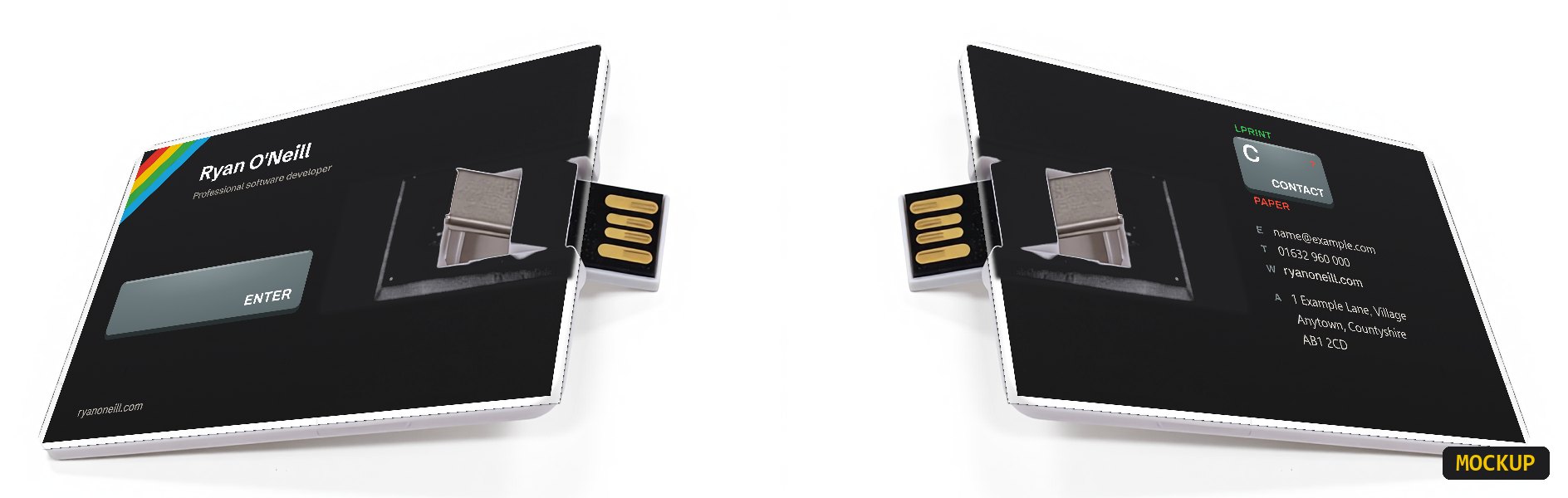
A useful starting point
In past client meetings, personalised demos have gone down well.
I’ve created prototype apps for two different audiences.
The first is for an accountant. It searches a condensed copy of HMRC’s VAT notices stored on the card, with suggestions appearing as you type. The other is for someone interested in the Charged Particle Optics software I work on. It searches the software’s help documentation in the same way. I’m currently experimenting with adding 3D visualisations to the particle app. Each runs from a single HTML file in a browser, with nothing to install.
If I’ve discussed a particular problem with someone, I could build a prototype around it, with their name and logo included.
It would give them a small example of my work, which seems a better use of the space than a folder full of sales material.
They can delete it
The demo files will live in a subfolder so the drive is easy to reuse.
If someone decides to delete the folder, that’s fine. The same goes for an IT policy that prevents them from plugging in unknown devices. The point is to give them something useful enough to keep around. My contact details will still be printed on the card, and I could publish a private URL as a fallback.
These will cost more than paper cards, so I wouldn’t give one to everyone. I’d keep some ordinary cards with the same design for general use, and save the USB cards for people I’ve had a proper conversation with.
I’m currently talking to suppliers about getting a small batch made. I’ll post an update when I have a card in my hands.